Code Assistant Skills for Accelerated llm-d Development, Evaluation and Configuration







Inference serving stacks such as llm-d are responsible for a wide range of sophisticated tasks, including request scheduling and batching, KV cache and memory management, multi-GPU execution, prefill/decode optimization, fault tolerance, autoscaling, and many others. Together, these responsibilities expose a vast configuration space that governs the behavior and performance of the serving system. At the same time, inference stacks are deployed under highly diverse operating conditions, varying in the models being served, the available hardware resources, and the characteristics of incoming workloads. As a result, practitioners must navigate a complex configuration process, where identifying effective parameter settings for a particular deployment often requires substantial expertise and iterative experimentation. This combination of extensive configurability and heterogeneous deployment environments creates a significant evaluation challenge: developers must reason about the interactions between numerous configuration parameters while ensuring that experimental results remain meaningful and comparable.
The challenge extends well beyond configuration alone. Modern inference serving stacks evolve rapidly, with frequent code changes driven by active development and increasingly accelerated by AI-assisted programming workflows. As the software evolves, configuration options become deprecated, new features are introduced, interfaces and deployment mechanisms change, and entire implementation technologies may be replaced. Under these conditions, designing reliable and reproducible performance evaluations becomes exceptionally difficult. Evaluating a continuously evolving serving stack is akin to trying to hit a moving target: the system under study is constantly changing, requiring evaluation methodologies that are both robust to software evolution and adaptable to emerging capabilities.
llm-d skills for reliable and accelerated configuration and evaluation
To address these challenges, we leverage code assistant skills to automate llm-d configuration and evaluation. Rather than relying on rigid automation scripts, we use skills as the primary abstraction for orchestrating existing llm-d tooling, code, and documentation. This allows the evaluation workflow to remain both structured and adaptable as the serving stack evolves. Considering that code assistants are themselves evolving into “super harnesses” capable of orchestrating increasingly sophisticated benchmarking and evaluation workflows, these skills can serve as modular building blocks that super harnesses can compose and invoke as needed.
We provide a collection of reusable skills that automate common operational tasks and support different stages of the llm-d lifecycle. These skills can be broadly divided into those intended for users deploying and evaluating llm-d, and those intended for developers extending or optimizing the serving stack.
User-supporting skills include:
- deploy-llm-d: Deploys an llm-d stack on an existing Kubernetes or OpenShift cluster using the Well-Lit Path guides and deployment variants.
- teardown-llm-d: Removes an llm-d deployment and cleans up the associated Helm/Kustomize resources.
- create-gke-infra-llm-d: Provisions a Google Kubernetes Engine cluster with the GPU networking, node pools, and Gateway API prerequisites required for llm-d.
- configure-wva-autoscaling-llm-d: Configures the Workload Variant Autoscaler (WVA) and generates reusable deployment scripts.
- llm-d-autoconfig: Collects workload requirements and SLA constraints to generate deployment recommendations and, optionally, deploy and benchmark the recommended configuration.
Developer-supporting skills include:
- run-llm-d-benchmark: Executes benchmark workloads against a deployed llm-d stack to collect performance metrics.
- compare-llm-d-configurations: Automates A/B evaluation by deploying, benchmarking, tearing down, and comparing multiple llm-d configurations.
- clear-kv-cache-tiers-in-llm-d-deployment: Clears KV cache state across GPU, CPU, and filesystem offload tiers without disrupting API availability, enabling repeatable experiments.
- kv-cache-pressure-load-designer (work in progress): Generates benchmark workload configurations that exercise specific request concurrency, stage, and count characteristics that reach the state where active requests collectively need more KV memory than the GPU has.
The complete collection of available skills is maintained in the llm-d Skills repository.
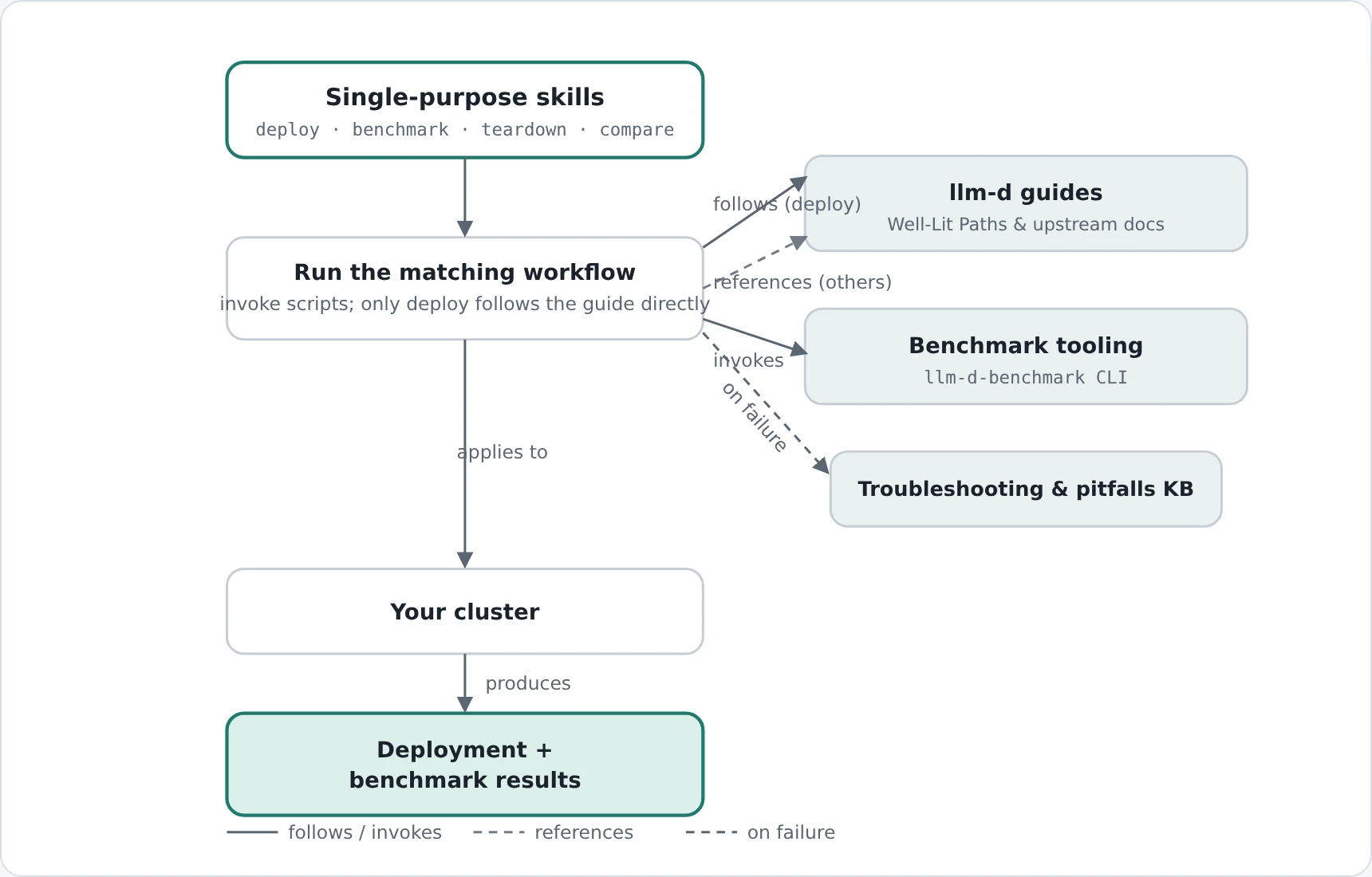 Single-purpose skills are dedicated to a single task, drawing on the llm-d guides and benchmark tooling, falling back to a troubleshooting KB when a step fails, and applying the result to your cluster.
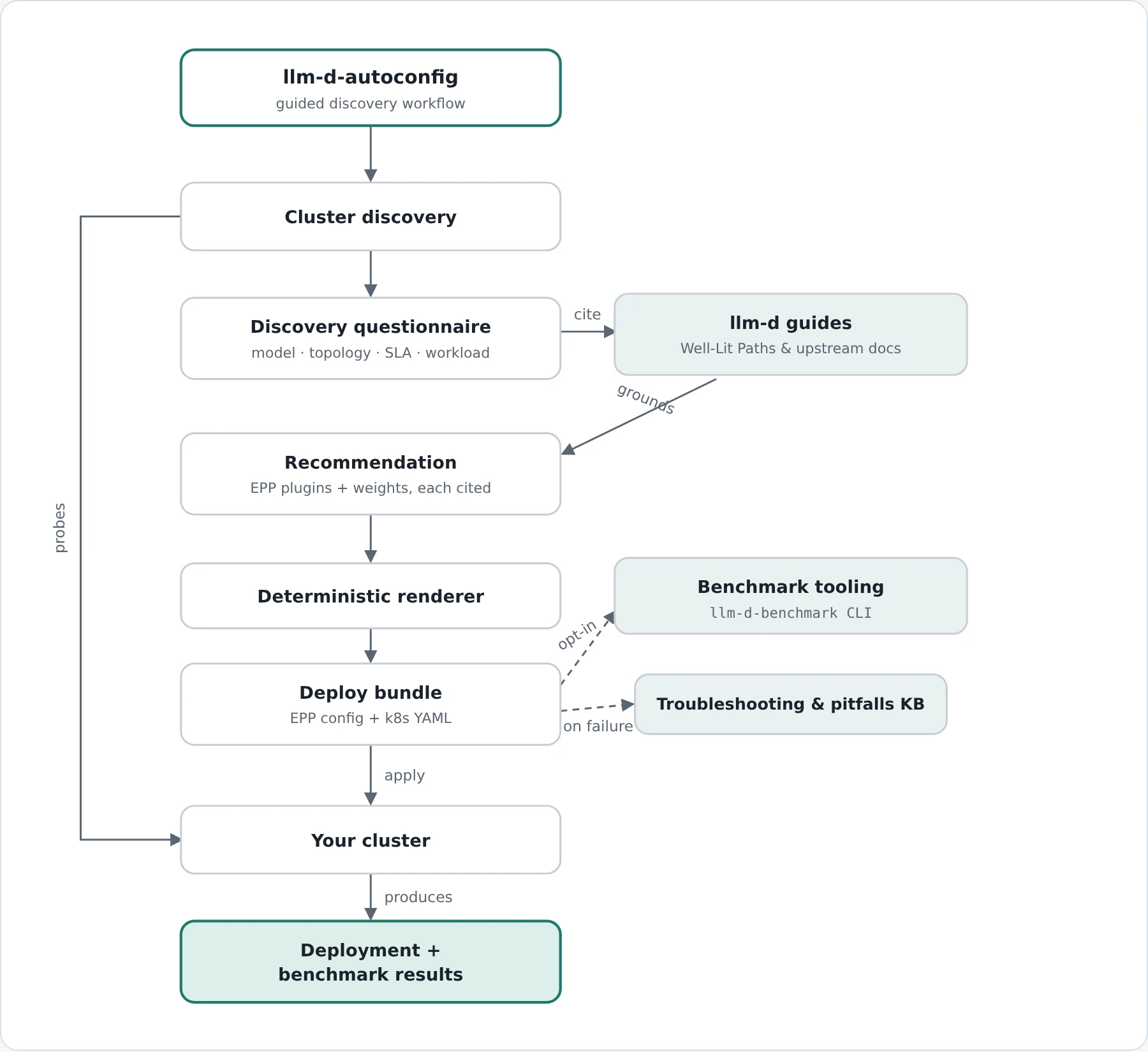 llm-d-autoconfig sits upstream of a configuration decision instead of executing one. It probes your cluster and works through a discovery questionnaire, then fetches and cites the same llm-d guides live to ground a recommendation before rendering it into a deploy bundle that's applied to your cluster.
How llm-d skills help achieve accelerated configuration and evaluation
Diverse llm-d benchmarking at scale
Over the course of three months, from May through July 2026, llm-d Skills powered a large-scale benchmarking campaign with minimal human intervention. During this period, we executed approximately 170 two-way and three-way comparison experiments, comprising more than 350 individual benchmark runs across different models, hardware, and software stack configurations.
The evaluation covered a broad spectrum of llm-d capabilities, including routing scorer heuristics, precise prefix cache-aware routing, multi-tier KV cache offloading with different eviction policies, and prefill/decode disaggregation using both vLLM and SGLang. The experiments also exercised a wide variety of workloads, ranging from synthetic benchmarks to traces from the inference-perf workload catalog, as well as agentic trace replay.
Beyond automating benchmark execution and enabling efficient exploration of the large configuration space, the skill-empowered code assistants proved remarkably resilient to the rapid evolution of the llm-d ecosystem that occurred during the benchmarking period. They seamlessly navigated non-backward-compatible changes across multiple vLLM releases, and accommodated major architectural transitions—including the migration from Helm-based deployments to Kustomize and the substantial refactoring of the llm-d-benchmark CLI. Crucially, this benchmarking campaign would not have been feasible at this scale or pace without the skills capturing operational knowledge and best practices as they emerged. By encoding deployment procedures, troubleshooting guidance, and lessons learned from previous experiments, the skills enabled the automation to continuously adapt to a rapidly evolving software ecosystem while shielding users from much of its underlying complexity. This accumulation of knowledge made it possible to sustain hundreds of benchmark runs despite the constant evolution of the llm-d stack.
From workload requirements to a deployable configuration with llm-d-autoconfig
While the benchmarking demonstrates the value of skills for evaluating configurations, the llm-d-autoconfig skill addresses the question that comes first: which configuration should be deployed in the first place? Choosing an Endpoint Picker (EPP) scheduler configuration for llm-d-router means selecting from a catalog of roughly 30 plugins, assigning weights, and wiring the result into chart values, a process that normally requires reading through several guides to even begin iterating on the right config for you.
Autoconfig turns this into a guided workflow, starting with a cluster discovery scan and then walking the user through a questionnaire covering the model, topology, SLAs, and workload shape, then building its recommendation by fetching the current upstream llm-d documentation. Every plugin, weight, and parameter it proposes is traced to a citation retrieved during the session, so recommendations are backed by the latest guides and docs rather than the model's own opinion. The goal is both adaptability as upstream guides evolve and to ground the model's config suggestions in reality. A deterministic renderer then produces the EPP configuration, a matching benchmark definition, and a deployment bundle rendered as a collection of k8s YAML files (one per resource).
In our experience, autoconfig has significantly reduced the time it takes to spin up and test new llm-d-router features. It also makes it straightforward to create custom deployments and share them as Kubernetes-deployable artifacts. The result is a simple, reproducible deployment record that's easy to replay on other clusters.
An example flow: from workload requirements to a validated deployment
To make this concrete, here is what the flow looks like: run on a GKE cluster with a pool of NVIDIA L4 GPUs already running vLLM pods serving Qwen3-8B, where autoconfig configures and deploys the routing layer on top. Against p95 targets of 1000ms for time-to-first-token and 100ms per output token.
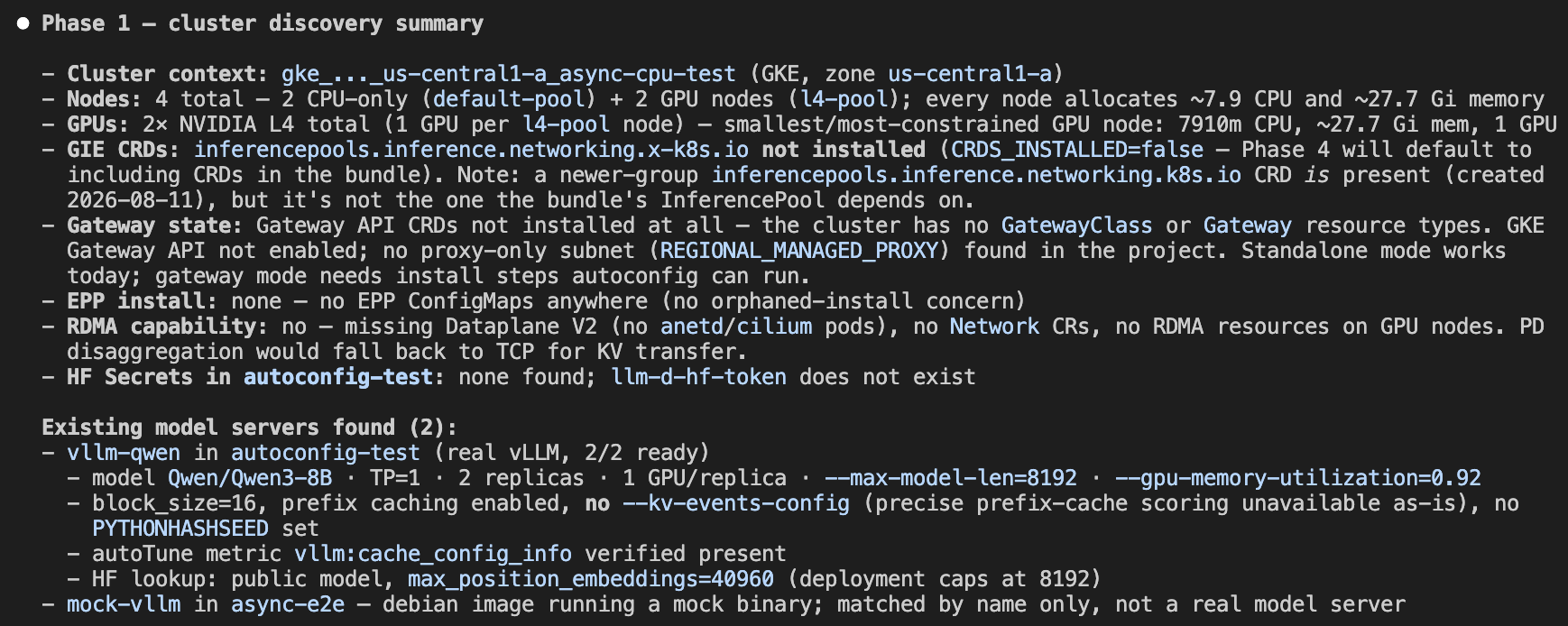
- Cluster discovery. The assistant scans the cluster with kubectl calls: GPUs, installed CRDs, gateway classes, and any existing model servers. The defaults for the questions that follow are based off what it finds.
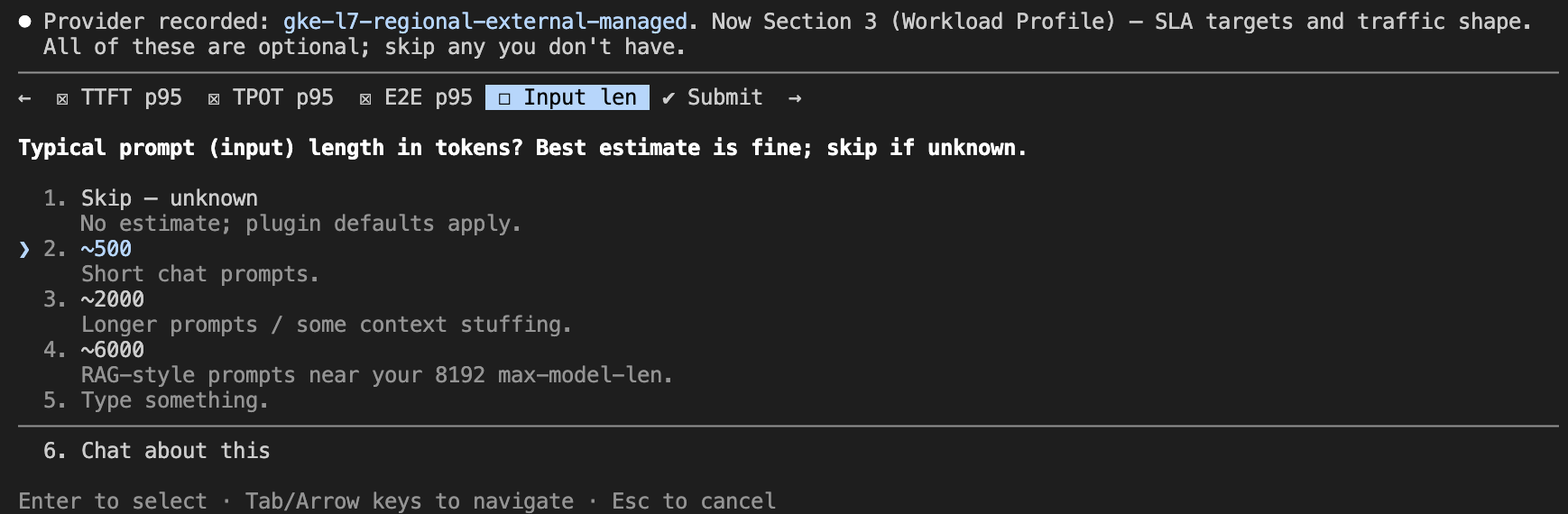
- Discovery questionnaire. The assistant walks through a questionnaire using its native interactive prompts: model, aggregated or prefill/decode topology, SLA targets, request shape (prompt and output lengths, how much prompt content is shared between requests), and optional features such as autoscaling, latency prediction, etc. Referring to the user if follow up information is needed.
-
Doc-grounded recommendation. The assistant fetches the current llm-d guides to justify each choice. In this run, it recommended the optimized-baseline plugin set, quoting the guide's values file, and even flagged that one default was calibrated for different hardware and should be re-measured with the guide's calibration recipe.
-
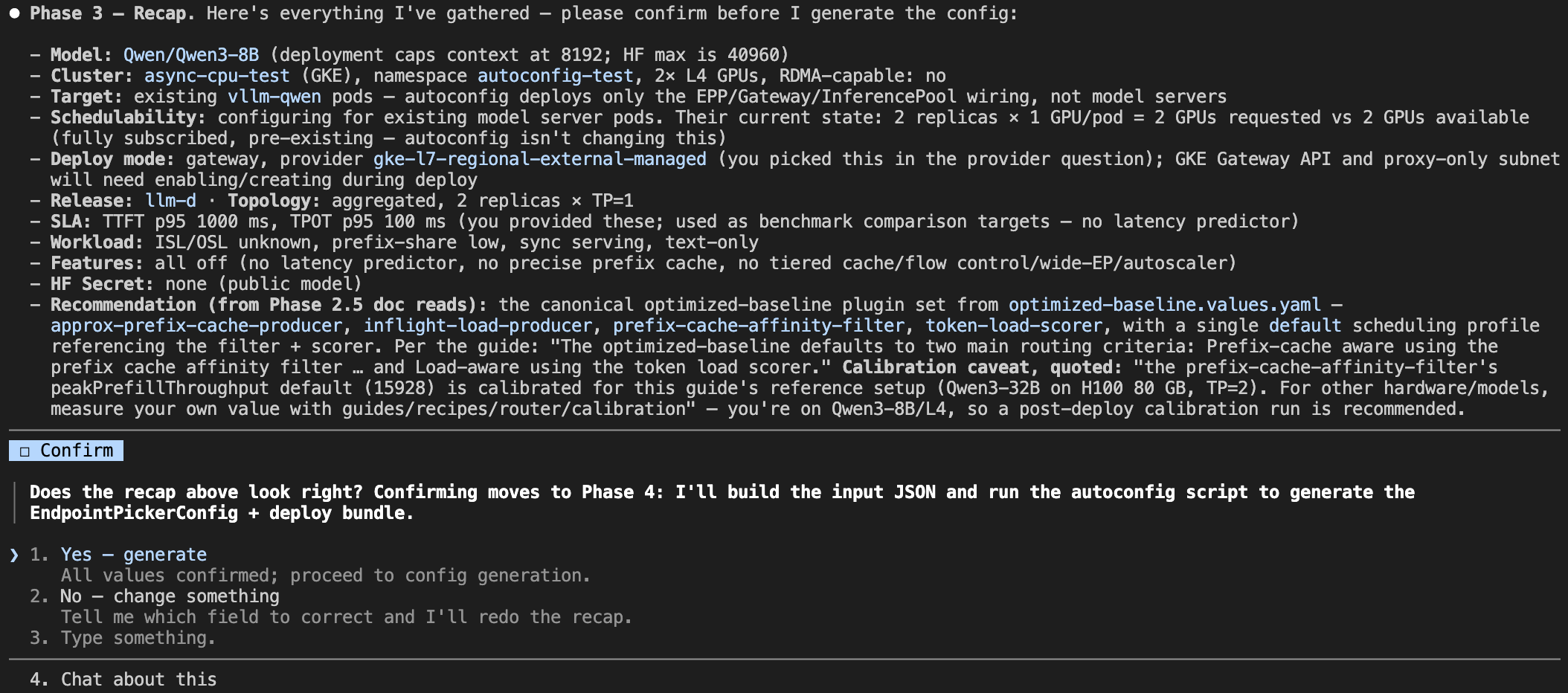
Recap and confirmation. Before anything is rendered, the assistant presents a recap, including an audit checking that the requested replicas and tensor parallelism actually fit the GPUs found in step 1.
-
Rendering. The deterministic renderer produces the EPP configuration, a benchmark definition, and the deployment bundle: a directory of Kubernetes YAML files, one per resource, with every parameter tagged with the evidence backing it.
-
Deploy. On approval, the assistant applies the bundle a step at a time with confirmations, and finishes with a smoke test against the gateway using the model name from the questionnaire.
-
Benchmark against the SLAs. Optionally, the assistant applies the generated benchmark job and compares the latency and throughput against the SLA targets from step 2, verifying the desired behavior.
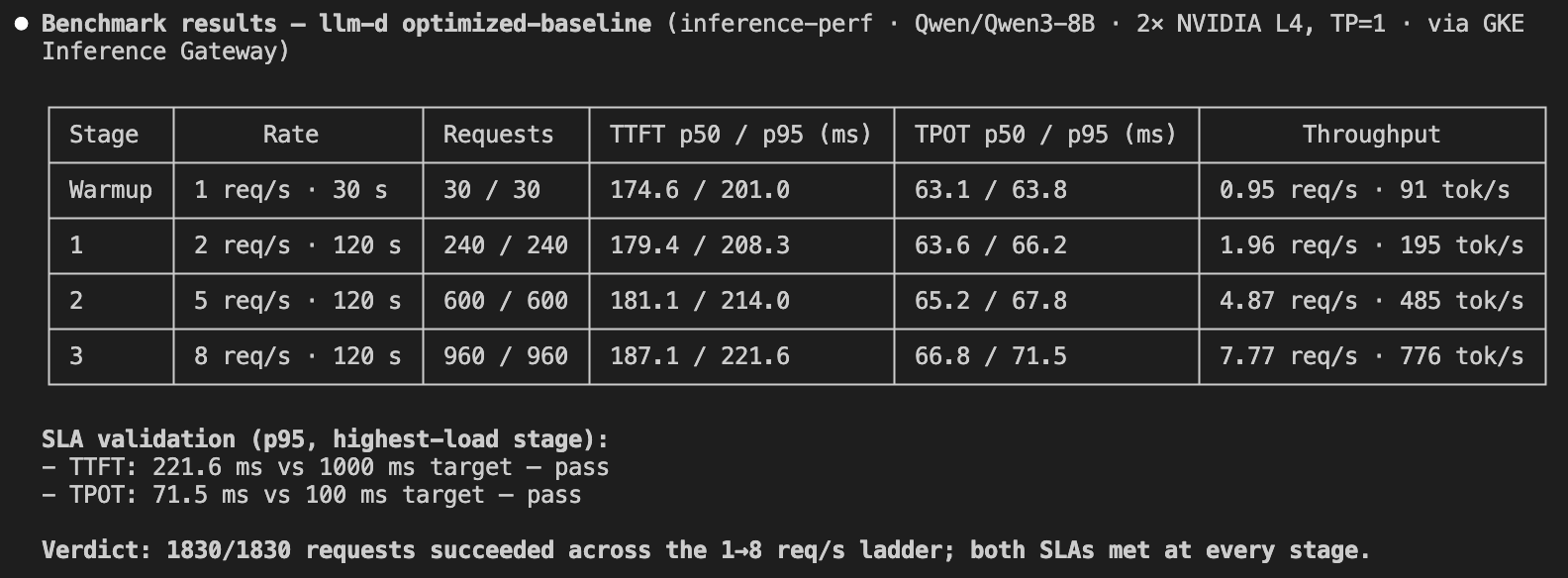
The interactive part of this flow only takes a few minutes, with the only real time sinks being waiting for the gateway to configure or waiting for the benchmark to run. The bundle directory is a versionable deployment record that others can replay with a single kubectl command. No Helm or repository clone required.
The Role of the Human-In-The-Loop
While the skills automate much of the deployment and benchmarking workflow, the human remains an essential part of the evaluation loop. The skills are designed around explicit checkpoints rather than unattended automation. In the autoconfig workflow, for example, the assistant presents a full recap of every input for confirmation before rendering anything, and each deployment step is approved individually. The assistant executes, but the human decides. Meaningful performance evaluation likewise requires more than simply collecting metrics - it requires interpreting the results to determine whether an experiment actually exercised the feature under investigation and whether the observed behavior supports valid conclusions. When experiments fail to provide meaningful insights, practitioners refine the deployment configuration, workload characteristics, or evaluation methodology and repeat the process. This iterative feedback loop also drives the evolution of the skills themselves. Common pitfalls encountered during benchmarking, recurring code assistant mistakes, and repetitive manual tasks are continuously distilled into new or improved skills. For example, we introduced capabilities such as provisioning an llm-d-ready GKE cluster and clearing KV cache state between benchmark runs after they were repeatedly identified as missing pieces during real benchmarking campaigns. As a result, the skills become progressively more capable over time, capturing operational knowledge and allowing future evaluations to benefit from the experience accumulated in previous ones.
Observations, Limitations and Lessons Learned
Building and maintaining reusable skills taught us that success depends not only on the quality of the implementation, but also on how knowledge is captured, maintained, and presented. Throughout our experience developing and working with skills, several recurring patterns and challenges emerged.
Finding the Right Level of Abstraction
One of the most important design decisions is choosing the appropriate level of abstraction. Skills that are too detailed tend to become outdated quickly and consume unnecessary context, making them expensive to use. On the other hand, skills that are too generic provide insufficient guidance, forcing the code assistant to rely on trial and error. The most effective skills strike a balance: they capture the essential workflow and decision points without prescribing every implementation detail.
Skills Require Continuous Maintenance
Skills should be treated like any other software artifact, and evolve alongside the systems they describe. As projects change, assumptions become outdated and best practices shift. Without regular maintenance, skills gradually lose their effectiveness.
We found that periodically refreshing skills with the help of skill-generation tools works well. In this workflow, a human specifies the desired changes and reviews the generated updates, ensuring that the skill remains both accurate and aligned with current development practices.
Explicit Guidance Matters
Not all best practices are equally easy for a code assistant to infer. Some behaviors that seem obvious to experienced developers can be surprisingly difficult for an assistant to identify consistently.
For example, we observed that the assistant occasionally struggled to determine when KV cache eviction was required. In some cases, it failed to evict the cache after a failed benchmark start, while in others it performed an unnecessary eviction after deploying a new stack. These scenario-specific operational rules should be documented as explicitly as possible. When appropriate, they should also be stored as persistent memory or reusable guidance to ensure consistent behavior across tasks.
Key Takeaway
The quality of a skill depends not only on its content but also on its longevity and clarity. Well-designed skills balance abstraction with specificity, evolve alongside the codebase, and make critical operational knowledge explicit rather than relying on implicit assumptions. Following these principles results in more reliable, efficient, and maintainable interactions with code assistants.
Try the skills yourself
All of the skills described in this post are available in the llm-d Skills repository. They follow the agentskills.io format, so they work with any code assistant that loads SKILL.md-based skills, including Gemini CLI and Claude Code. Simply copy a skill folder into the respective skills directory, describe your task (e.g. "Help me configure llm-d for my workload."), and the skill should walk you through the rest. You can also automatically install the skills or a subset of them via Claude Code plugin marketplace. See the Installation Section for more details.
Each skill's README documents its current capabilities, prerequisites, and scope. If you find a gap, we would love to hear about it: issues and contributions to the skills repo are welcome, and as described above, real-world pain points are exactly what drive the next round of skills.